Documentation Index
Fetch the complete documentation index at: https://www.bolna.ai/docs/llms.txt
Use this file to discover all available pages before exploring further.
1. Introduction
Why on-premise?
Deploying Voice AI infrastructure on your own server (on-premises or self-managed cloud infrastructure) instead of relying entirely on third-party SaaS solutions has several strategic, technical, and operational advantages, especially for companies focused on privacy, control, and performance.
Security
With an on-premises deployment, all data remains within your corporate network, ensuring enhanced security as it is not transmitted over the Internet. This setup helps in complying with strict data privacy and protection regulations.
Components
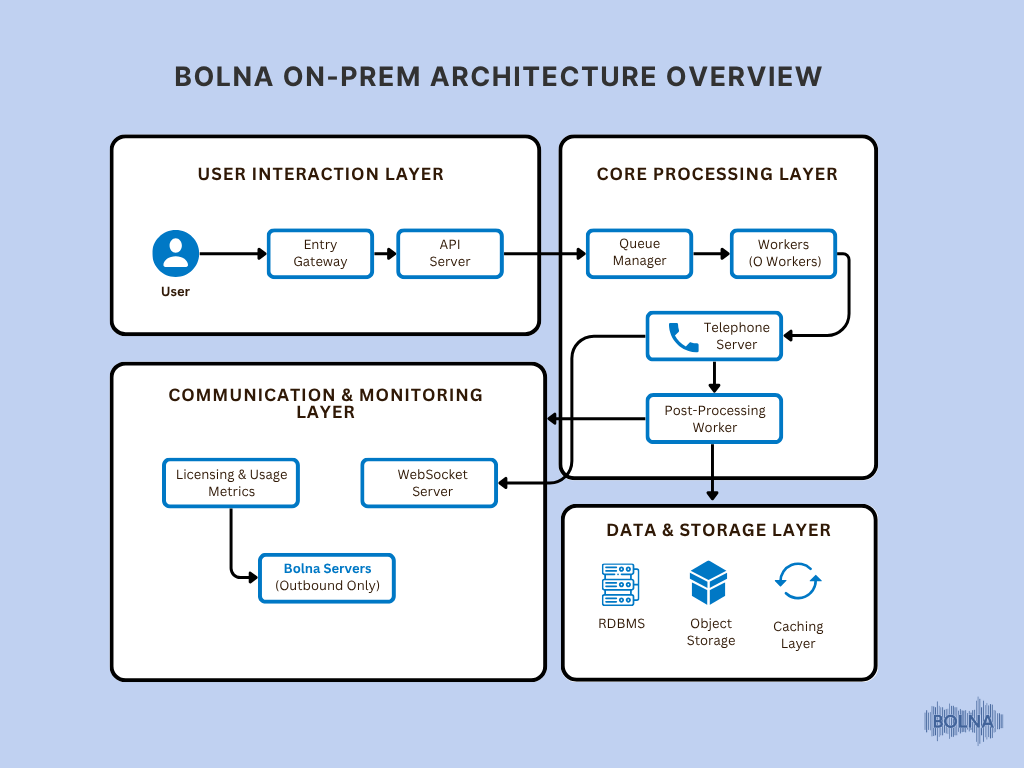
Prerequisites
Docker: Install Docker on your system to manage the containerized application.
# Add Docker's official GPG key:
sudo apt-get update
sudo apt-get install ca-certificates curl
sudo install -m 0755 -d /etc/apt/keyrings
sudo curl -fsSL https://download.docker.com/linux/ubuntu/gpg -o /etc/apt/keyrings/docker.asc
sudo chmod a+r /etc/apt/keyrings/docker.asc

# Add the repository to Apt sources:
echo \
 "deb [arch=$(dpkg --print-architecture) signed-by=/etc/apt/keyrings/docker.asc] https://download.docker.com/linux/ubuntu \
 $(. /etc/os-release && echo \"$VERSION_CODENAME\") stable" | \
 sudo tee /etc/apt/sources.list.d/docker.list > /dev/null
sudo apt-get update

# Install the latest version of Docker
sudo apt-get install docker-ce docker-ce-cli containerd.io docker-buildx-plugin docker-compose-plugin

# Verify Docker is running
sudo docker run hello-world

# Install Docker Compose plugin
sudo apt install -y docker-compose-plugin

# Verify Docker Compose version
docker compose version
- Instance type: c6a.xlarge
- Object storage: AWS S3
- Relational Database: PostgreSQL 16.3, RAM: 8GB+
- Caching layer: Redis 7.10, 4GB RAM (Instance type: cache.t4g.medium)
- Message Queueing Channel: RabbitMQ 13.13.7, RAM: 8GB (Instance type: mq.m5.large)
2. Deployment Environments
This documentation will cover specific instructions and considerations for deploying the services within an AWS environment, ensuring optimal configuration and performance.
3. Self-Service Licensing & Credentials
Self-hosting key can be either generated from our dashboard or contact enterprise@bolna.ai
4. Deploy All Services
Login to Bolna’s ghcr
echo <GITHUB_PAT> | docker login ghcr.io -u <GITHUB_USERNAME> --password-stdin
Pull images
docker pull ghcr.io/bolna-ai/api_server:v1
docker pull ghcr.io/bolna-ai/ws_server:v1
docker pull ghcr.io/bolna-ai/telephone_server:v1
docker pull ghcr.io/bolna-ai/q_manager:v1
docker pull ghcr.io/bolna-ai/q_worker:v1
docker pull ghcr.io/bolna-ai/arq_worker:v1
Docker Compose File:
Create a docker-compose.yml File
version: '3.8'
services:
  api_server:
    image: ghcr.io/bolna-ai/api_server:v1
    container_name: api_server
    ports:
      - "5001:5001"
    env_file:
      - .env
    restart: always
  telephone_server:
    image: ghcr.io/bolna-ai/telephone_server:v1
    container_name: telephone_server
    ports:
      - "8001:8001"
    env_file:
      - .env
    restart: always
  q_worker:
    image: ghcr.io/bolna-ai/q_worker:v1
    container_name: q_worker
    ports:
      - "5002:5002"
    env_file:
      - .env
    restart: always
  q_manager:
    image: ghcr.io/bolna-ai/q_manager:v1
    container_name: q_manager
    ports:
      - "5003:5003"
    env_file:
      - .env
    restart: always
  ws_server:
    image: ghcr.io/bolna-ai/ws_server:v1
    container_name: ws_server
    ports:
      - "5005:5005"
    env_file:
      - .env
    restart: always
  arq_worker:
      image: ghcr.io/bolna-ai/arq_worker:v1
      container_name: arq_worker
      env_file:
        - .env
      restart: always
      command: ["arq", "arq_worker.WorkerSettings"]
Start docker compose:

